Haltech uC-10 Display Dash pinout
ecurecovery.com/pinouts/haltech/uc-10 · Every pin checked against 2 Haltech documents · data checked 2026-11-04
Haltech uC-10 Display Dash pinout
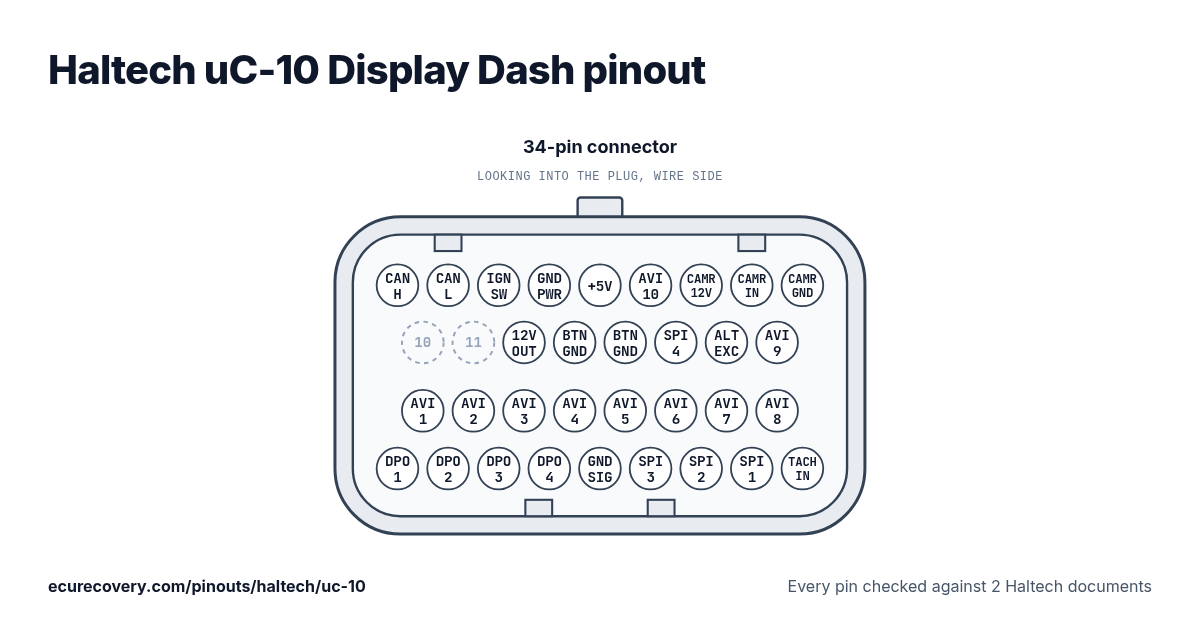
Every pin of the 34-pin connector, with Haltech's own pin names. Tap a pin to see what it does.
Every pin checked against 2 Haltech documentsPick any pin on the drawing or in the table to see its function and the documents it was checked in.
Haltech uC-10 Display Dash 34-pin connector pinout
| Pin | Function |
|---|---|
| 1 | CAN High |
| 2 | CAN Low |
| 3 | +12V switched input |
| 4 | Battery ground |
| 5 | +5V output |
| 6 | AVI 10 (Button 1) |
| 7 | Camera +12V power |
| 8 | Camera input |
| 9 | Camera ground |
| 10 | Not used |
| 11 | Not used |
| 12 | +12V switched output |
| 13 | Ground for buttons |
| 14 | Ground for buttons |
| 15 | SPI 4 (Button 2) |
| 16 | Alternator Excite |
| 17 | AVI 9 (Park Lights) |
| 18 | AVI 1 (Fuel Level) |
| 19 | AVI 2 |
| 20 | AVI 3 |
| 21 | AVI 4 |
| 22 | AVI 5 (Left Indicator) |
| 23 | AVI 6 (Right Indicator) |
| 24 | AVI 7 (Handbrake) |
| 25 | AVI 8 (High Beam) |
| 26 | DPO 1 |
| 27 | DPO 2 |
| 28 | DPO 3 |
| 29 | DPO 4 |
| 30 | Signal ground |
| 31 | SPI 3 |
| 32 | SPI 2 |
| 33 | SPI 1 |
| 34 | Tacho input |
Locked Haltech map file? Check it free. You see proof from your own file before you pay anything.
Check my map freeHaltech uC-10 Display Dash pins at a glance
- Which pins are CAN on the Haltech uC-10 Display Dash?
- CAN High: pin 1. CAN Low: pin 2.
- Which pins are ground on the Haltech uC-10 Display Dash?
- Battery ground: pin 4. Signal ground: pin 30.
- Which pins power the Haltech uC-10 Display Dash?
- +12V switched input: pin 3.
- Which pins are the sensor supplies on the Haltech uC-10 Display Dash?
- +5V output: pin 5.
Haltech uC-10 Display Dash pinout sheet
A printable sheet with every pin, made from the checked data on this page.
Where this comes from
Only Haltech's own documents. Pin names and notes are written exactly as Haltech writes them.
Haltech quick start guide
Haltech pinout table (support site)
How we checked it
- We start from the pinout table in Haltech's quick start guide for this dash.
- Every pin is read again from Haltech's support article for the dash, which shows the same table as a picture (read by eye).
- A pin is only shown when both give the same function; where they differ, the page says so. Haltech gives no wire colours for the dash harness, so none are shown.
- Labels are Haltech's own words; words in brackets are its suggested uses, which can be changed in NSP.
Where Haltech's documents disagree
Pin 7: Haltech's support article shows this pin as Unused; the uC-10 Quick Start Guide (June 2026) lists 'Camera +12V power'. Shown: the guide.
Pin 8: Haltech's support article shows this pin as Unused; the uC-10 Quick Start Guide (June 2026) lists 'Camera input'. Shown: the guide.
Pin 9: Haltech's support article shows this pin as Unused; the uC-10 Quick Start Guide (June 2026) lists 'Camera ground'. Shown: the guide.
ECU Recovery is not affiliated with Haltech. Haltech and its product names are trademarks of Haltech. If your harness came with its own diagram, check your wiring against it.
More Haltech pinouts
- Haltech Elite 550 pinout
- Haltech Elite 750 pinout
- Haltech Elite 950 pinout
- Haltech Elite 1000 pinout
- Haltech Elite 1500 pinout
- Haltech Elite 2000 pinout
- Haltech Elite 2500 pinout
- Haltech Elite VMS / VMS T pinout
- Haltech Nexus T1 pinout
- Haltech Nexus T2 pinout
- Haltech Nexus S2 pinout
- Haltech Nexus S3 pinout
- Haltech Nexus R3 pinout
- Haltech Nexus R5 pinout
- Haltech Nexus Rebel LS pinout
- Haltech Platinum Sport 1000 pinout
- Haltech Platinum Sport 2000 pinout
- Haltech Platinum Sprint 500 pinout
- Haltech Platinum Sprint RE pinout
- All Haltech pinouts →
Have a Haltech map file? Open it in the free Haltech map viewer.
Map locked with a password?
We unlock Haltech, MaxxECU, LinkECU, Vi-PEC, ECUMaster, Emtron and FuelTech maps. You see proof from your own file first and only pay $159.99 if it works.
Unlock a map