Link G4+ Force GDI pinout
ecurecovery.com/pinouts/link-ecu/g4-plus-force-gdi · Every pin from Link's own guide for this ECU, read twice · data checked 2026-11-01
Link G4+ Force GDI pinout
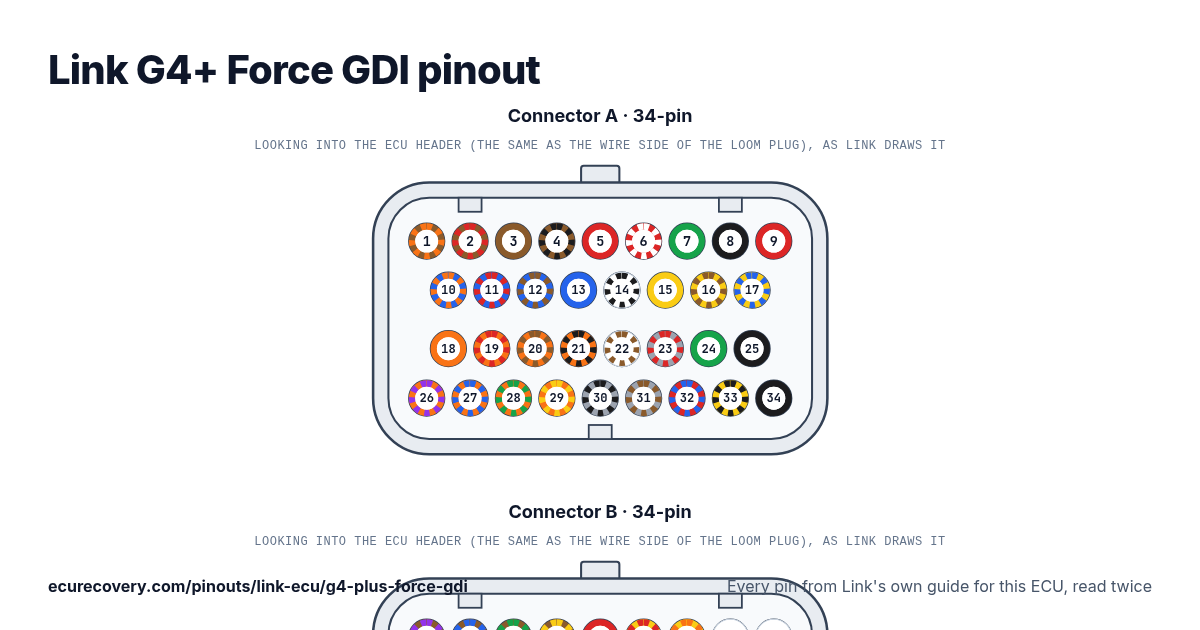
Every pin of the 34-pin A and 34-pin B connectors, with the wire colours of Link's harness. Tap a pin to see what it does.
Every pin from Link's own guide for this ECU, read twicePick any pin on the drawing or in the table to see its function, its wire colour and the documents it was checked in.
Link G4+ Force GDI connector A pinout (34-pin)
| Pin | Function | Wire | Link note |
|---|---|---|---|
| A1 | +14V Bat | Brown/Orange | |
| A2 | Inj 1+ | Brown/Red | |
| A3 | Inj 2+ | Brown | |
| A4 | GDI Pump | Brown/Black | |
| A5 | +14V | Red | |
| A6 | +8V | Red/White | |
| A7 | Shield/Gnd | Green | |
| A8 | Trig 1 | Black | |
| A9 | Trig 2 | Red | |
| A10 | Ign 4 | Blue/Orange | |
| A11 | Ign 3 | Blue/Red | |
| A12 | Ign 2 | Blue/Brown | |
| A13 | Ign 1 | Blue | |
| A14 | An Volt 4 | White/Black | |
| A15 | Temp 1 | Yellow | |
| A16 | Temp 2 | Yellow/Brown | |
| A17 | An Volt 1 | Yellow/Blue | |
| A18 | Aux 10* | Orange | Aux 8, Aux 10 only on serial numbers 32384 and greater. Otherwise Aux 8 is blank and Aux 10 pin is assigned to Aux 4. |
| A19 | Aux 3 | Orange/Red | |
| A20 | Aux 2 | Orange/Brown | |
| A21 | Aux 1 | Orange/Black | |
| A22 | An Volt 2 | White/Brown | |
| A23 | DI 3 | Grey/Red | |
| A24 | Gnd Out | Green | |
| A25 | Ground | Black | |
| A26 | Aux 8* | Orange/Purple | Aux 8, Aux 10 only on serial numbers 32384 and greater. Otherwise Aux 8 is blank and Aux 10 pin is assigned to Aux 4. |
| A27 | Aux 7 | Orange/Blue | |
| A28 | Aux 6 | Orange/Green | |
| A29 | Aux 5 | Orange/Yellow | |
| A30 | DI 1 | Grey/Black | |
| A31 | DI 2 | Grey/Brown | |
| A32 | +5V | Red/Blue | |
| A33 | An Volt 3 | Yellow/Black | |
| A34 | Ground | Black |
Link G4+ Force GDI connector B pinout (34-pin)
| Pin | Function | Wire | Link note |
|---|---|---|---|
| B1 | Inj 2B | Brown/Purple | |
| B2 | Inj 2A | Brown/Blue | |
| B3 | Inj 1B | Brown/Green | |
| B4 | Inj 1A | Brown/Yellow | |
| B5 | +14V Aux 9/10 | Red | |
| B6 | Temp 3 | Yellow/Red | |
| B7 | Temp 4 | Yellow/Orange | |
| B8 | Knock 2 | White | |
| B9 | Knock 1 | White | |
| B10 | Heater | Blue/Purple | |
| B11 | RE | Blue/Black | |
| B12 | IPE | Blue/Green | |
| B13 | APE | Blue/Yellow | |
| B14 | MES | Blue/White | |
| B15 | An Volt 6 | White/Red | |
| B16 | An Volt 7 | White/Orange | |
| B17 | Shield / Gnd | Green | |
| B18 | Aux 4 / EThr. +* | Purple/White | Aux 4 can not be used if EThrottle is used. EThr 1 & 2: See Force GDI Specific Wiring for EThrottle wiring requirements |
| B19 | DI 6 | Grey/Green | |
| B20 | DI 5 | Grey/Yellow | |
| B21 | DI 4 | Grey/Orange | |
| B22 | Gnd Out | Green | |
| B23 | An Volt 8 | White/Yellow | |
| B24 | An Volt 9 | White/Green | |
| B25 | Ground | Black | |
| B26 | Aux 9 / EThr. -* | Purple | EThr 1 & 2: See Force GDI Specific Wiring for EThrottle wiring requirements |
| B27 | DI 10 / CAN 2 H* | Grey/Purple | DI 9/10 can be used as CAN2 or Digital Input |
| B28 | DI 9 / CAN 2 L* | Grey/White | DI 9/10 can be used as CAN2 or Digital Input |
| B29 | DI 8 | Grey | |
| B30 | DI 7 | Grey/Blue | |
| B31 | An Volt 10 | White/Blue | |
| B32 | An Volt 11 | White | |
| B33 | An Volt 5 | Yellow/Green | |
| B34 | Ground | Black |
Link G4+ Force GDI pins at a glance
- Which pins are the crank and cam inputs on the Link G4+ Force GDI?
- Trig 1: pin A8 (Black). Trig 2: pin A9 (Red).
- Which pins are the injector outputs on the Link G4+ Force GDI?
- Inj 1+: pin A2 (Brown/Red). Inj 2+: pin A3 (Brown). Inj 2B: pin B1 (Brown/Purple). Inj 2A: pin B2 (Brown/Blue). Inj 1B: pin B3 (Brown/Green). Inj 1A: pin B4 (Brown/Yellow).
- Which pins are the ignition outputs on the Link G4+ Force GDI?
- Ign 4: pin A10 (Blue/Orange). Ign 3: pin A11 (Blue/Red). Ign 2: pin A12 (Blue/Brown). Ign 1: pin A13 (Blue).
- Which pins are ground on the Link G4+ Force GDI?
- Gnd Out: pins A24, B22 (Green). Ground: pins A25, A34, B25, B34 (Black).
- Which pins power the Link G4+ Force GDI?
- +14V: pin A5 (Red).
- Which pins are the sensor supplies on the Link G4+ Force GDI?
- +8V: pin A6 (Red/White). +5V: pin A32 (Red/Blue).
- Which pins are the wideband sensor connections on the Link G4+ Force GDI?
- Heater: pin B10 (Blue/Purple). RE: pin B11 (Blue/Black). IPE: pin B12 (Blue/Green). APE: pin B13 (Blue/Yellow). MES: pin B14 (Blue/White).
Link G4+ Force GDI pinout sheet
A printable sheet with the connector drawings and every pin, made from the checked data on this page.
Where this comes from
Only Link's own documents. Pin names and notes are written exactly as Link writes them.
Link quick start guide for this ECU
Plug drawing: TE Connectivity customer drawing (used for the drawing only)Third party
How we checked it
- Link publishes one pinout document for each ECU: its quick start guide. Every pin here comes from that guide. Link's full wiring manual is only inside its PCLink software, so it is not used.
- A script reads every pin from the guide. Each pin is then read a second time: from Link's guide for a sister ECU that shows the same pin, from the I/O table in the same guide, or by eye from the same guide.
- A pin is only shown when both readings agree on its function and, where Link gives one, its wire colour. Pin numbers are the ones Link prints in its guides.
- Labels, notes and wire colours are written exactly as Link writes them, for example Brown/Orange.
ECU Recovery is not affiliated with Link. Link and its product names are trademarks of Link. If your harness came with its own diagram, check your wiring against it.
More Link pinouts
- Link G5 Voodoo Neo4 pinout
- Link G5 Voodoo Neo6 pinout
- Link G5 Voodoo Pro pinout
- Link G5 Voodoo Pro V2 pinout
- Link G4X AtomX pinout
- Link G4X MonsoonX pinout
- Link G4X StormX pinout
- Link G4X FuryX pinout
- Link G4X XtremeX pinout
- Link G4+ Atom pinout
- Link G4+ Monsoon pinout
- Link G4+ Storm pinout
- Link G4+ Fury pinout
- Link G4+ Xtreme pinout
- Link G4+ Thunder pinout
- Link G4+ Kurofune pinout
- All Link pinouts →
Have a Link map file? Open it in the free Link map viewer.
Map locked with a password?
We unlock Haltech, MaxxECU, LinkECU, Vi-PEC, ECUMaster, Emtron and FuelTech maps. You see proof from your own file first and only pay $159.99 if it works.
Unlock a map