A tuner emails you a map. Or you find an old backup on a USB stick, and the laptop that had the tuning software on it is long gone. You don't want to change anything. You just want to look at the fuel table.
For most standalone ECUs, that used to mean installing the manufacturer's software, and that means Windows. Haltech's NSP, MaxxECU's MTune and LinkECU's PCLink are all Windows programs. On a Mac, a Linux laptop or a phone, the file just sits there.
You can read it in a browser instead. We built a free ECU map viewer for exactly this. Here is what it opens, what you get to see, and where it stops.
Which map files it opens
The viewer reads maps from three brands, saved with the software each one uses.
- Haltech: Nexus and Elite maps saved with NSP (
.nexmap), older Elite maps saved with ESP (.e550-2xxup to.e2500-2xx, firmware 2.06 and later) and Platinum Pro and Sport maps from ECU Manager. There is a dedicated Haltech map viewer page. - MaxxECU:
.MaxxECU-savefiles from MTune. See the MaxxECU map viewer. - LinkECU: G4X maps (
.pclx) and G4+ maps (.pclr) from PCLink. See the LinkECU map viewer.
Maps from other brands, such as ECUMaster, Emtron and FuelTech, don't open yet. Older G4 LinkECU maps (.pcl) and Haltech maps saved on beta ESP firmware don't either.
How to open a map in your browser
- Find the file. It's whatever you saved from your tuning software, or whatever your tuner sent you.
- Go to the map viewer and drop the file on the page, or choose it from your device.
- Wait a few seconds while the file is checked and its tables are built.
- Pick a table from the list on the left.
There's no sign-up. It runs in any modern browser, so a Mac, a Windows PC, a Linux machine, an iPad or a phone all work.
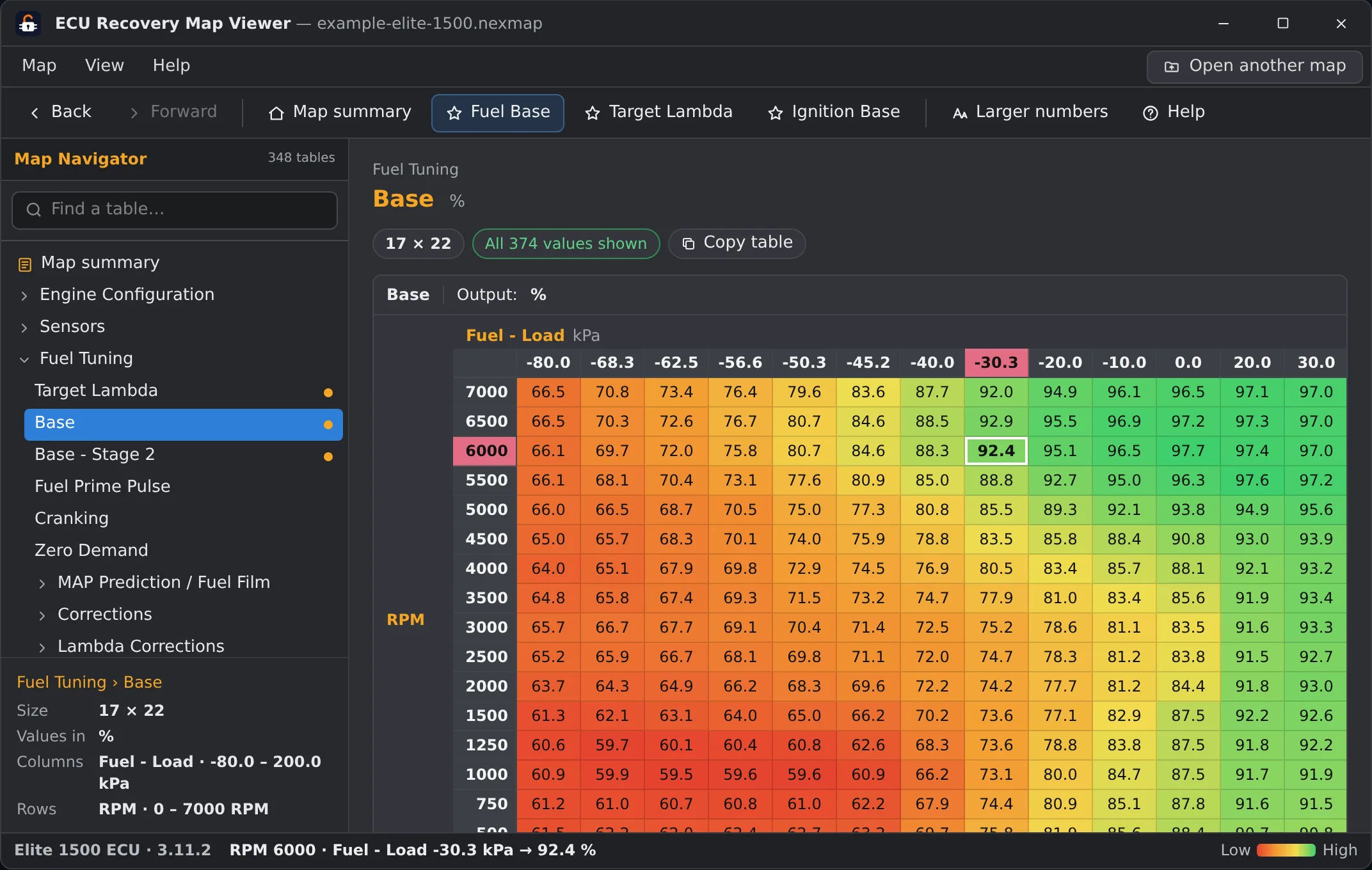
What you see once it's open
The window is laid out like the software your file was saved with. Haltech maps get the table navigator you know from NSP, ESP or ECU Manager, MaxxECU maps open on MTune's own pages, and LinkECU maps look like PCLink. Tables keep the manufacturer's names and units, so Fuel Base is still called Fuel Base.
A few things are worth knowing:
- Every number comes straight from your file. If the viewer can't read a table with certainty, it leaves that table out instead of guessing.
- Click a cell and you see its axis points, for example the RPM and load it sits at.
- You can copy a whole table, axes included, and paste it into Excel or Google Sheets.
- On Haltech maps saved with NSP there is also a map summary. It lists the settings that differ from Haltech's factory values and the functions that are switched on, read as written in the file.
Base maps open too
If you're after a starting point rather than your own tune, the base maps Haltech publishes are .nexmap files, and the base maps MaxxECU publishes are .MaxxECU-save files. Both open in the viewer like any other unlocked map. It's a quick way to see how a base map is set up before you download the software.
It's read-only
The viewer doesn't edit anything and it never talks to an ECU. You can't change a value or write a map to the car. For that you still need the manufacturer's software on a Windows machine.
What it's good for is the quick questions. What's in this file? What does this table look like? Did the tuner change what I asked for? That last one is easier with two files side by side, and we wrote a separate guide on how to compare two ECU maps.
Is my file saved?
Not by the free viewer. The file is only used to build the view and is deleted right after. We don't keep a copy, and the view isn't published anywhere. Our unlock service is a separate flow with its own handling, which the privacy policy describes.
What if the map is locked?
Some maps carry a password set by the tuner, and a locked file can't be shown in full. A locked Haltech or MaxxECU map opens in a preview with part of the real values visible and the rest hidden. A password-protected LinkECU map goes straight to the unlock step.
If you want the whole map, we can remove the lock. You see proof from your own file first, and you only pay if it works. Not sure whether your file is locked? Our guide on how to tell if your tune file is locked covers the signs, and the unlock page starts the process.
If your file isn't locked, drop it into the viewer and take a look.