FuelTech FT550 腳位圖
ecurecovery.com/pinouts/fueltech/ft550 · 每個腳位都最少與 4 份 FuelTech 文件中的兩份核對 · 數據核對於 2026-11-04
腳位圖
FuelTech FT550 腳位圖
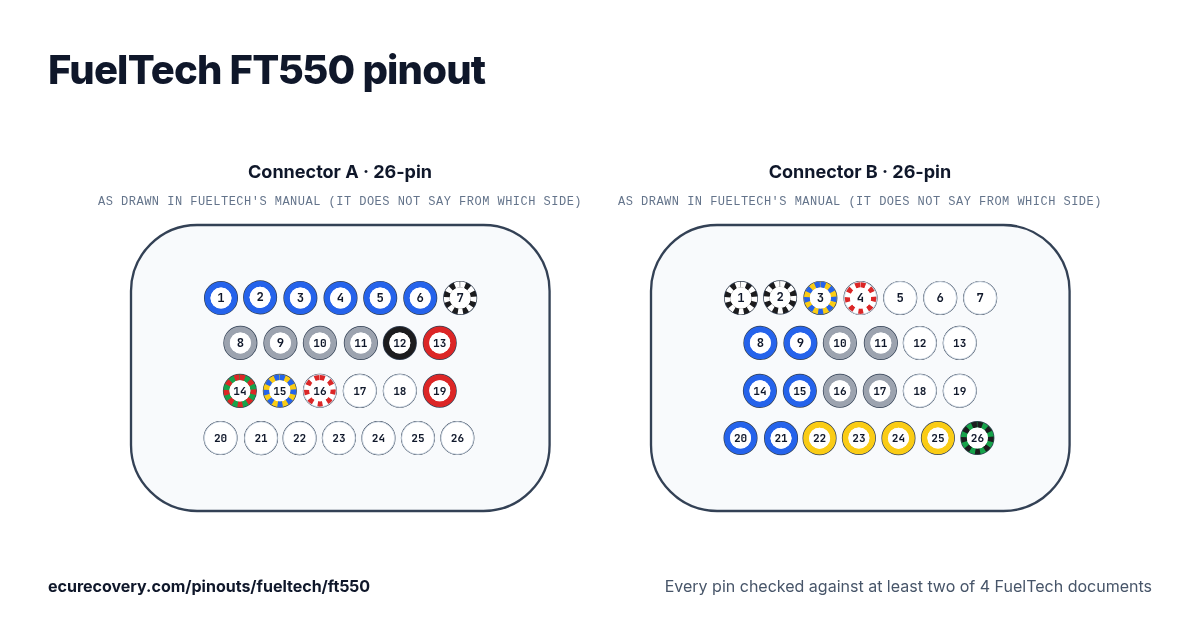
26 針 A 插頭及 26 針 B 插頭的每一個腳位,附 FuelTech 線束的線色。輕按腳位即可查看它的功能。
每個腳位都最少與 4 份 FuelTech 文件中的兩份核對在圖上或表格中選擇任何腳位,即可查看它的功能、線色及核對時所用的文件。
FuelTech FT550 插頭 A 腳位(26 針)
| 腳位 | 功能 | 線色 | FuelTech 備註 |
|---|---|---|---|
| A1 | Blue output #1 | Blue #1藍色 | These outputs are usually used for injector control. When needed, they can be configured as auxiliary outputs. |
| A2 | Blue output #2 | Blue #2藍色 | These outputs are usually used for injector control. When needed, they can be configured as auxiliary outputs. |
| A3 | Blue output #3 | Blue #3藍色 | These outputs are usually used for injector control. When needed, they can be configured as auxiliary outputs. |
| A4 | Blue output #4 | Blue #4藍色 | These outputs are usually used for injector control. When needed, they can be configured as auxiliary outputs. |
| A5 | Blue output #5 | Blue #5藍色 | These outputs are usually used for injector control. When needed, they can be configured as auxiliary outputs. |
| A6 | Blue output #6 | Blue #6藍色 | These outputs are usually used for injector control. When needed, they can be configured as auxiliary outputs. |
| A7 | Power ground input | Black/white黑色/白色 | Directly wired to the battery negative terminal with no seams. Do not tap any other grounds to this wire, it must run clean straight to the battery negative terminal. |
| A8 | Gray output #1 | Gray #1灰色 | These outputs are usually used for ignition control. When needed, they can be set up as injector outputs or auxiliary outputs. |
| A9 | Gray output #2 | Gray #2灰色 | These outputs are usually used for ignition control. When needed, they can be set up as injector outputs or auxiliary outputs. |
| A10 | Gray output #3 | Gray #3灰色 | These outputs are usually used for ignition control. When needed, they can be set up as injector outputs or auxiliary outputs. |
| A11 | Gray output #4 | Gray #4灰色 | These outputs are usually used for ignition control. When needed, they can be set up as injector outputs or auxiliary outputs. |
| A12 | Battery negative input | Black黑色 | Connected directly to the battery negative with no seams. Do not connect this wire to the chassis, engine block or head. |
| A13 | 12V input from relay | Red紅色 | Connected to the pin 87 of the Main Relay |
| A14 | 5V outputs for sensors | Green/Red綠色/紅色 | 5V voltage output for TPS, electronic throttle and pedal sensors |
| A15 | CAN A (-) | Yellow/Blue黃色/藍色 | |
| A16 | CAN A (+) | White/Red白色/紅色 | |
| A17 | CAM sync signal input | Shielded Cable (white)白色屏蔽線 | Connected to the cam sync sensor (hall or magnetic) |
| A18 | Magnetic RPM sensor reference | Black Shielded Cable (White)白色屏蔽線 | Connected to the negative wire of the magnetic sensor. When OEM ECU is reading the sensor in parallel, split this wire with OEM sensor negative - Do not connect when using hall effect sensor. |
| A19 | RPM signal input | Black Shielded Cable (Red)紅色屏蔽線 | Connected to the crank trigger sensor (hall or magnetic) or to the distributor. To VR sensors, use the shield wire the sensor shield. To Hall sensor, do not use the shield as negative |
| A20 | Input #1 | White #1白色 | Sensors input |
| A21 | Input #2 | White #2白色 | Sensors input |
| A22 | Input #3 | White #3白色 | Sensors input |
| A23 | Input #4 | White #4白色 | Sensors input |
| A24 | Input #5 | White #5白色 | Sensors input |
| A25 | Input #6 | White #6白色 | Sensors input |
| A26 | Input #7 | White #7白色 | Sensors input |
FuelTech FT550 插頭 B 腳位(26 針)
| 腳位 | 功能 | 線色 | FuelTech 備註 |
|---|---|---|---|
| B1 | Power ground inputs | Black/White黑色/白色 | Directly wired to the battery negative terminal with no seams. Do not tap any other grounds to this wire, it must run clean straight to the battery negative terminal. |
| B2 | Power ground inputs | Black/White黑色/白色 | Directly wired to the battery negative terminal with no seams. Do not tap any other grounds to this wire, it must run clean straight to the battery negative terminal. |
| B3 | CAN B (-) | Yellow/Blue黃色/藍色 | |
| B4 | CAN B (+) | White/Red白色/紅色 | |
| B5 | Input #8 | White #8白色 | Sensors input |
| B6 | Input #9 | White #9白色 | Sensors input |
| B7 | Input #10 | White #10白色 | Sensors input |
| B8 | Blue output #7 | Blue #7藍色 | These outputs are usually used for injector control. When needed, they can be configured as auxiliary outputs. |
| B9 | Blue output #8 | Blue #8藍色 | These outputs are usually used for injector control. When needed, they can be configured as auxiliary outputs. |
| B10 | Gray output #5 | Gray #5灰色 | These outputs are usually used for ignition control. When needed, they can be set up as injector outputs or auxiliary outputs. |
| B11 | Gray output #6 | Gray #6灰色 | These outputs are usually used for ignition control. When needed, they can be set up as injector outputs or auxiliary outputs. |
| B12 | Input #11 | White #11白色 | Sensors input |
| B13 | Input #12 | White #12白色 | Sensors input |
| B14 | Blue output #9 | Blue #9藍色 | These outputs are usually used for injector control. When needed, they can be configured as auxiliary outputs. |
| B15 | Blue output #10 | Blue #10藍色 | These outputs are usually used for injector control. When needed, they can be configured as auxiliary outputs. |
| B16 | Gray output #7 | Gray #7灰色 | These outputs are usually used for ignition control. When needed, they can be set up as injector outputs or auxiliary outputs. By standard, Gray output #8 is used as a tachometer output. (FT550) |
| B17 | Gray output #8 | Gray #8灰色 | These outputs are usually used for ignition control. When needed, they can be set up as injector outputs or auxiliary outputs. By standard, Gray output #8 is used as a tachometer output. (FT550) |
| B18 | Input #13 | White #13白色 | Sensors input or Power Shift Input - Blue wire Strain gage sensor (positive) |
| B19 | Input #14 | White #14白色 | Sensors input or Power Shift Input - Orange wire Strain gage sensor (negative) |
| B20 | Blue output #11 | Blue #11藍色 | These outputs are usually used for injector control. When needed, they can be configured as auxiliary outputs. |
| B21 | Blue output #12 | Blue #12藍色 | These outputs are usually used for injector control. When needed, they can be configured as auxiliary outputs. |
| B22 | Yellow output #1 | Yellow #1黃色 | Electronic throttle and step motor outputs. Also used as injection or auxiliary outputs (cooling fan, fuel pump, etc.) |
| B23 | Yellow output #2 | Yellow #2黃色 | Electronic throttle and step motor outputs. Also used as injection or auxiliary outputs (cooling fan, fuel pump, etc.) |
| B24 | Yellow output #º3 | Yellow #3黃色 | Electronic throttle and step motor outputs. Also used as injection or auxiliary outputs (cooling fan, fuel pump, etc.) |
| B25 | Yellow output #4 | Yellow #4黃色 | Electronic throttle and step motor outputs. Also used as injection or auxiliary outputs (cooling fan, fuel pump, etc.) |
| B26 | Ground for sensors | Green/Black綠色/黑色 | Connected the sensors ground |
FuelTech 的 Map 檔被鎖? 免費檢查。付款前你會先看到從你自己檔案得出的驗證結果。
免費檢查我的 MapFuelTech FT550 腳位速查
- FuelTech FT550 的 CAN 是哪幾個腳位?
- CAN A (-): 腳位 A15 (Yellow/Blue). CAN A (+): 腳位 A16 (White/Red). CAN B (-): 腳位 B3 (Yellow/Blue). CAN B (+): 腳位 B4 (White/Red).
- FuelTech FT550 的曲軸及凸輪軸訊號輸入是哪幾個腳位?
- CAM sync signal input: 腳位 A17 (Shielded Cable (white)). Magnetic RPM sensor reference: 腳位 A18 (Black Shielded Cable (White)). RPM signal input: 腳位 A19 (Black Shielded Cable (Red)).
- FuelTech FT550 的噴油嘴輸出是哪幾個腳位?
- Blue output #1: 腳位 A1 (Blue #1). Blue output #2: 腳位 A2 (Blue #2). Blue output #3: 腳位 A3 (Blue #3). Blue output #4: 腳位 A4 (Blue #4). Blue output #5: 腳位 A5 (Blue #5). Blue output #6: 腳位 A6 (Blue #6). Blue output #7: 腳位 B8 (Blue #7). Blue output #8: 腳位 B9 (Blue #8). Blue output #9: 腳位 B14 (Blue #9). Blue output #10: 腳位 B15 (Blue #10). Blue output #11: 腳位 B20 (Blue #11). Blue output #12: 腳位 B21 (Blue #12).
- FuelTech FT550 的點火輸出是哪幾個腳位?
- Gray output #1: 腳位 A8 (Gray #1). Gray output #2: 腳位 A9 (Gray #2). Gray output #3: 腳位 A10 (Gray #3). Gray output #4: 腳位 A11 (Gray #4). Gray output #5: 腳位 B10 (Gray #5). Gray output #6: 腳位 B11 (Gray #6). Gray output #7: 腳位 B16 (Gray #7). Gray output #8: 腳位 B17 (Gray #8).
- FuelTech FT550 的接地是哪幾個腳位?
- Power ground input: 腳位 A7 (Black/white). Power ground inputs: 腳位 B1, B2 (Black/White).
- FuelTech FT550 的供電是哪幾個腳位?
- 12V input from relay: 腳位 A13 (Red).
- FuelTech FT550 的感應器供電是哪幾個腳位?
- 5V outputs for sensors: 腳位 A14 (Green/Red).
資料來源
只使用 FuelTech 自己的文件。腳位名稱及備註完全按照 FuelTech 的原文書寫。
FuelTech FT450 / FT550 / FT550LITE / FT600 手冊
FuelTech 4 汽缸通用線束手冊
FuelTech 6 汽缸通用 A 線束手冊
FuelTech Sportsman 數據記錄 A 線束手冊
FuelTech PRO550 線束手冊
核對方法
- 我們由 FuelTech 這款 ECU 手冊中的腳位表開始:腳位、線色及功能。
- 再在第二份 FuelTech 文件中把每個腳位重新讀一次:列出每個 ECU 腳位及其線色的線束手冊,FT700 則使用其快速參考。由程式逐個腳位比對。
- 只有第二份文件給出相同的線色及功能,才會顯示該腳位。FuelTech 的通用電線以顏色加編號命名(Blue #1 即藍色輸出 1),所以編號亦必須一致。
- 標籤、備註及線色完全按照 FuelTech 的寫法。
ECU Recovery 與 FuelTech 並無關連。FuelTech 及其產品名稱是 FuelTech 的商標。如你的線束附有自己的接線圖,請以它為準核對接線。
Map 被密碼鎖住?
我們可以解鎖 Haltech、MaxxECU、LinkECU、Vi-PEC、ECUMaster、Emtron 及 FuelTech 的 Map。你會先看到從你自己檔案得出的驗證結果,確認有效才需支付 US$159.99。
解鎖 Map